Windows 11 desktop — 2026-09-27
Internals, for contributors and reviewers.
The first recorded run of obsync on Windows. It covers validation V4 (a folder renamed on Windows, including a folder that is itself a selected sync folder) and issue #201's Windows item: the NTFS rename, trash and link paths. It also covers issue #222: a restore from history, and an offline conflict, each leave exactly one copy.
Setup
- Windows: Windows 11 Pro 24H2 (10.0.26100) on ARM64, in a virtual machine (UTM, QEMU, 4 cores, 8 GB). A local account, the vault on the system drive (NTFS).
- Obsidian: Obsidian 1.13.7 (Electron 43.3.0, Chromium 150, Node 24.18.1),
from the official Windows ARM64 installer. Its SHA-256 was checked before
installing:
F233DC24896B3F2D5F9E4B01111181A561D0760B2105F0A474024C5F3143A9BC. - The vault and plugin:
win-test, a disposable vault. The plugin is the 1.1.4 train build atc6ce1d2,main.jsSHA-25682a7576665307fcb9963587061bb603144a2ac38b93c16235fcb14b34ad776ed. It was copied into the vault, because 1.1.4 is not published yet. Community plugins were turned on through Obsidian's own "Trust author and enable plugins". - The server: obsyncd built from the same train, on the host's loopback in
plain HTTP. The virtual machine reaches it as its own
127.0.0.1:18731(QEMU user networking and anetshport proxy), so nothing went to any other address; the desktop plugin accepts a loopbackhttpaddress. - The other device: a macOS desktop, Obsidian 1.13.4, the same build, syncing the whole vault.
- The folder selection: saved on Windows before pairing, as
docs/validation.mdasks: the foldersW201andW201 sel. - How it was driven: every act and every check was page JavaScript over each Obsidian's DevTools port. The Windows port reached the host only through a forward bound to the host's loopback. Timings are on the host clock around the act and the observer's wait.
Pairing
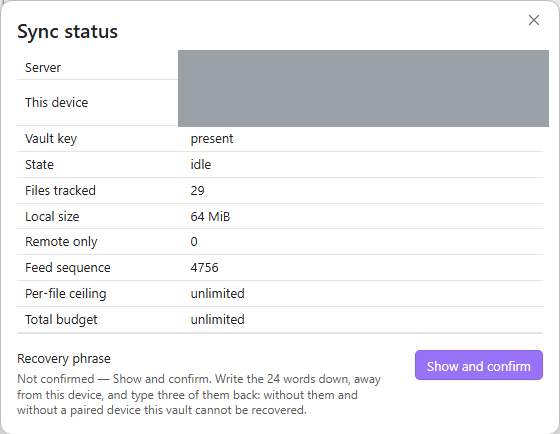
The Server URL was typed into obsync's settings on Windows, followed by Pair this device with a one-time code from the macOS desktop.
- The approval prompt on macOS named the new device as a "Windows PC" running obsync 1.1.4, and said it would sync vault "win-test" (0 notes).
- The match code the prompt asked for was the one Windows showed. It was compared before approving.
- Windows was paired, and read
syncedandidlestraight away.
After Obsidian was quit and started again on Windows, the device was still
paired, under the same device id, with no prompt, and idle. The plugin's
data.json held credentialRef and credentialRevision; neither the vault
key nor the device secret appears anywhere in the file. So the credential is
held in the operating system's secret storage (V16), on Windows too.
Journeys
| # | What | Result | Time | Observed |
|---|---|---|---|---|
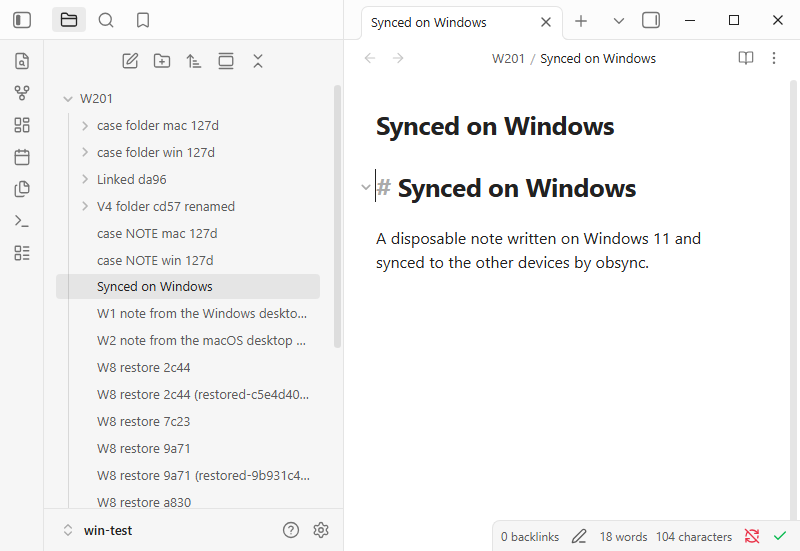
| W1 | A note made on Windows | pass | 1.3 s | On macOS under the same name, identical bytes (49 bytes), nothing done there. |
| W2 | A note made on macOS | pass | 1.6 s | On Windows under the same name, identical bytes. |
| W3 | V4: a folder of 3 notes and a subfolder with 1, renamed on Windows | pass | 0.5 s | On macOS under the new name: the same 4 files and bytes. The old name is gone, and the trash is unchanged on both. |
| W4 | V4: the selected folder W201 sel itself renamed on Windows |
fail | 120 s | macOS shows both notes under the new name with identical bytes, and the Windows selection names the new path. But macOS still holds an empty folder under the old name: issue #240. |
| W5 | Case-only renames on NTFS (Case note → case NOTE, Case Folder → case folder), made on each side in turn |
pass | 0.5 s each way | The other side shows the new spelling on disk, 1 copy, no deletion. |
| W6 | The trash, both ways | pass | 1.0 s from Windows, 2.5 s from macOS | The note left the other vault, the status there read synced, and no error notice appeared. |
| W7 | A junction inside the vault, pointing at a folder outside it | pass | at the next sync | Refused with the notice "obsync doesn't sync linked folders: … is a link, so it stays on this device only". macOS received nothing from it, and no folder under its name. Logged decision=excluded reason=symlink_component. |
| W8 | #222: a note with two versions, Restore from history → the first → Restore a copy | pass | 0.5 s | The notice said the copy was saved. Exactly 1 restored copy, holding the first version's exact bytes, the same copy on macOS, and no error notice. |
| W9 | #222: the same note edited on both sides while the server was down; macOS synced first | pass | 0.4 s | Windows met the conflict. 1 conflict copy on Windows and 1 on macOS; both edits kept, one in the note, one in the copy. |
| W10 | A 64 MiB file of random bytes made on Windows | pass | 6.2 s | On macOS with an identical SHA-256. |
Findings
- W4, issue #240 (1.1.5). Renaming a folder that is itself a selected sync folder moves its notes correctly everywhere. But the old folder's removal is judged against the selection after the rename, refused as out of scope, and never sent, so every other device keeps an empty folder under the old name.
- It dates from 1.1.0, and the same test fails at 1.1.3.
- The workaround was tried live: deleting the leftover empty folders on the macOS desktop (which syncs the whole vault) removed them from a third device within seconds.
- #222 on this machine. No
directory_fsyncline was logged in W8 or W9: syncing the folder did not fail here, as it does on the CI's Windows runner. What #222 asks of a real machine held all the same: a restore gives exactly one copy and no error, and a conflict leaves exactly one copy. - The rewrite detector, by design. The first W9 attempt edited the note on macOS by script 2–4 s after it arrived, with no keyboard input. obsync treated that as a plugin answering a sync (#179), paused the note on macOS and said so. Resume in Show sync status cleared it. The recorded attempt waits out the 5 s window, as a person's edit would; typing is never treated this way.
Not covered here
- The production install: Community plugins → Browse → Install, and a later Check for updates to the published 1.1.4, on Windows. Owed once 1.1.4 is released.
- An x64 Windows machine. CI's
obsidian-windowsandplugin-tests (windows-2025)legs run on x64. - A file another program holds open. Covered by CI's
obsidian-windowsleg, not by this run. - A server running on Windows, or a setup token pasted from PowerShell: the server ran on the host.